
Ek simple mirror selfie ko AI se naya look diya ja sakta hai. Is guide mein do styles hain: pehla warm lighting aur arch-shaped mirror ke saath casual men’s portrait; doosra blue LED mirror, white dress aur roses ke saath festive women’s portrait. Apni photo upload karke in prompts ko try karein.
Pehle Apni Photo Taiyar Karein
Aisi photo choose karein jisme face saaf dikh raha ho. Agar aap chahte hain ki AI aapka chehra pehchaan mein rakhe, to uploaded photo ko identity reference banane wala prompt use karein. AI ka result tool aur reference photo ke hisaab se badal sakta hai, isliye final image ko save karne se pehle check zaroor karein.
Style 1: Warm LED Arch Mirror Selfie
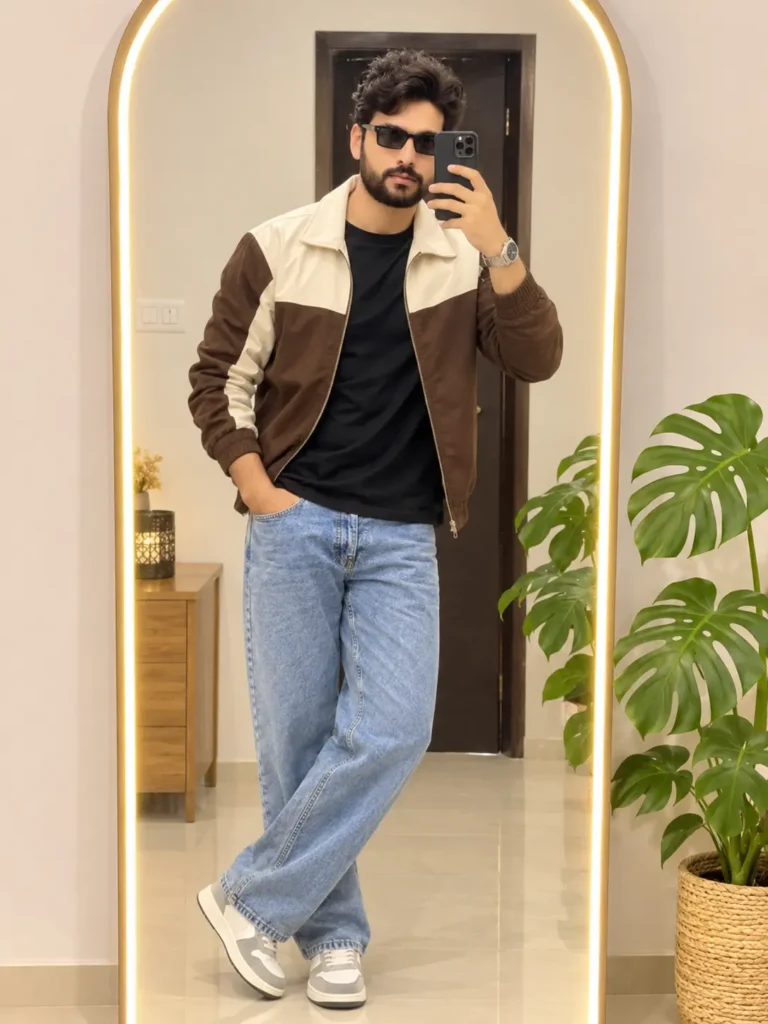
Is look mein brown-and-cream jacket, black T-shirt aur light blue jeans hain. Background mein warm white glow wala tall arch mirror, wooden side table aur green indoor plant hai.
Copy-Paste Prompt
AI Boy Mirror Selfie Photo Editing Prompt
Style 2: Blue LED Mirror Selfie with Roses
Is design mein ek irregular, wavy-shaped mirror neeli LED roshni se chamakta hai. Woman white embroidered dress pehne bouquet of red roses pakadti hai, aur shoulder par burgundy bag hai. Wall par trailing green vines blue lighting ke saath contrast banati hain.

Copy-Paste Prompt
AI Girl Red Roses Mirror Selfie Prompt
Dono Styles Banane Ke Steps
- Apni photo upload karein: AI photo-editing tool mein image upload ya image-reference option choose karein
- Ek prompt select karein: Warm arch mirror look ke liye Style 1; blue wavy mirror aur roses ke liye Style 2 use karein.
- Prompt paste karein: Prompt ko poora copy karke tool ke text box mein daalein.
- Framing choose karein: Agar aspect ratio ka option ho, to vertical 3:4 select karein. Tool mein ye option na ho to available portrait size use karein.
- Result check karein: Face, hands, outfit, mirror reflection, lighting aur background ko zoom karke dekhein. Pasand na aaye to prompt mein jis detail ko sudharna hai, usko saaf likhkar dobara generate karein.
Result Behtar Karne Ke Chhote Tips
- Face reference se alag lag raha ho to clearer photo try karein aur identity-preservation instruction prompt mein rehne dein.
- Mirror reflection ulta-pulta ho to add karein: “Show one consistent, physically realistic mirror reflection.”
- Kapdon ka rang badal raha ho to exact colour ko prompt mein dobara likhein—jaise “brown-and-cream jacket” ya “white embroidered dress.”
- Blue lighting bahut tez ho to add karein: “Keep the blue LED glow soft and balanced, with natural skin tones.”
- AI se text ya logos add na karwayein; zaroorat ho to baad mein image editor mein khud add karein.
Frequently Asked Questions
Kya main apni selfie ko in styles mein edit kar sakta hoon?
Haan. Apni photo upload karke pasand ka prompt use karein. Tool reference image editing support karta ho, ye check kar lein.
Kya AI mera face bilkul same rakhega?
AI aapke facial features ko preserve karne ki koshish karega, lekin exact match har tool ya generation mein guaranteed nahi hota. Clear reference photo madad kar sakti hai.
Kaunsa style phone wallpaper ke liye achha rahega?
Dono vertical portraits hain. Apne phone ke wallpaper dimensions ke mutabik crop ya resize kar lein.
Conclusion
In dono LED mirror selfie prompts se aap warm arch mirror ya blue-lit mirror aur roses wala portrait bana sakte hain. Apni photo upload karein, pasand ka prompt use karein, aur save karne se pehle final image ki details check kar lein.
More prompts like this
https://aiwithansh.com/trending-chatgpt-photo-editing-2026-2/