
Want to turn your photo into a bold, colorful game-cover-style portrait? This AI photo prompt gives your image a neon coastal-city setting, dramatic sunset colors, and illustrated poster details. Upload a clear photo, copy the prompt below, and try it in your preferred AI image editor.
Copy-Paste AI Photo Prompt
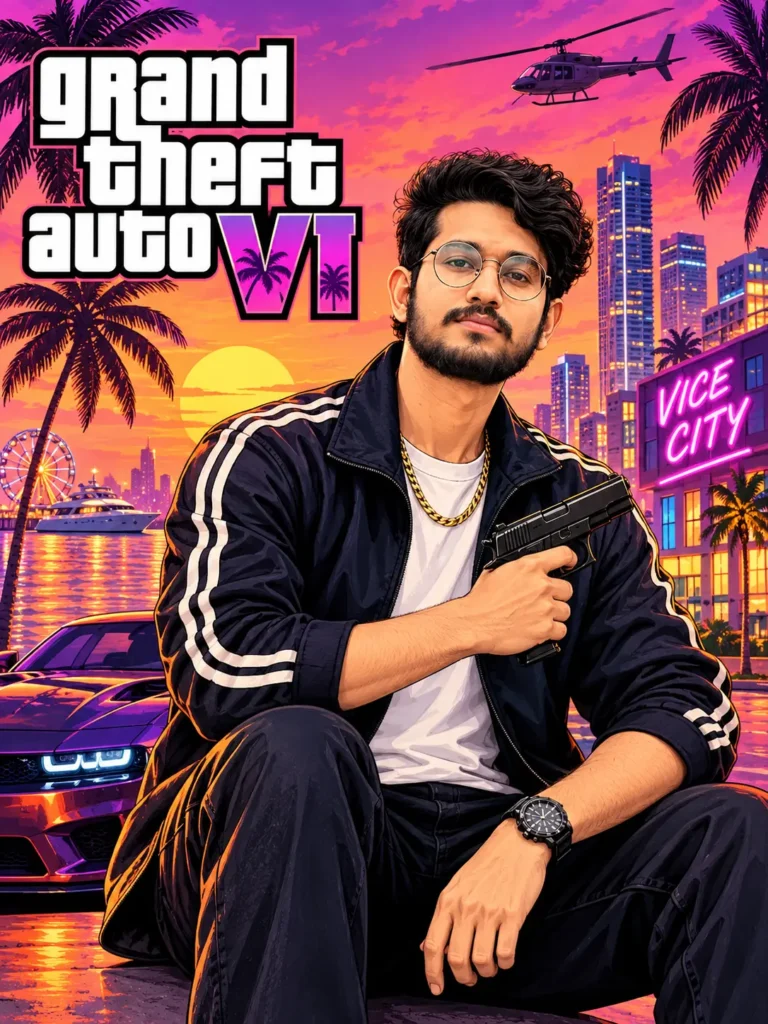
Use my uploaded photo as the face and identity reference. Create a bold illustrated Grand Theft Auto: Vice City–inspired poster. Show me sitting confidently in the foreground, wearing a dark sporty jacket with light stripes, a white T-shirt, gold chain and wristwatch. I am holding a clearly visible black handgun across my chest, matching the reference image’s placement and pose. Add a vivid pink-purple sunset, palm trees, neon-lit city skyline, a helicopter in the sky, waterfront reflections and a car partly visible behind me. Use dramatic orange highlights, deep shadows and detailed comic-book poster artwork. Keep my face recognizable, the gun fully visible and the hands naturally wrapped around it. Include large stacked “Grand Theft Auto VI” title text at upper left and a small “VICE CITY” neon sign on the right. Portrait 3:4 composition, vibrant colors, detailed illustrated finish.
How to Create the Image
- Open an AI image editor that lets you upload a reference photo.
- Choose a clear, well-lit photo where your face is visible.
- Copy and paste the prompt into the editor.
- Generate the image, then adjust details such as jacket color, pose, or city lighting if needed.
- Save the result in the editor’s available resolution.
For a closer match, describe the pose, clothing, colors, and background clearly. Image results can vary across AI tools, so you may need to generate a few versions.
Tips for a Better Result
- Use a sharp, front-facing or slightly angled photo.
- Ask the editor to preserve your recognizable facial features.
- If the hands or prop look distorted, regenerate with “natural hands and clear object placement.”
- Add the exact colors or outfit details you want to keep.
- Use vertical 3:4 framing for a poster-like portrait.
Frequently Asked Questions
Can I use this prompt with my own photo?
Yes. Upload a photo you have permission to use and tell the image editor to use it as the identity reference.
Why does the generated image look different from the reference?
AI editors interpret prompts differently. Try a clearer reference photo and repeat key details such as the pose, hairstyle, outfit, and lighting.
Can I change the jacket or background?
Yes. Replace the outfit or setting in the prompt—for example, use a red jacket, a blue evening sky, or a rainy city street.
Which image size should I choose?
A portrait 3:4 ratio works well for poster-style artwork. Choose a larger available size if you want to crop or print the result.
Conclusion
This GTA 6 Cover Art Style AI Photo Prompt for Boys can help you create a colorful, illustrated portrait inspired by neon city game posters. Upload a clear photo, paste the prompt, and customize the styling to suit your taste.