Kabhi-kabhi ek simple outdoor photo bhi bahut achhi lag sakti hai, bas usme lighting aur composition sahi honi chahiye. Green plants, soft sunlight, casual outfit aur ek natural pose milkar photo ko fresh aur aesthetic look de sakte hain.
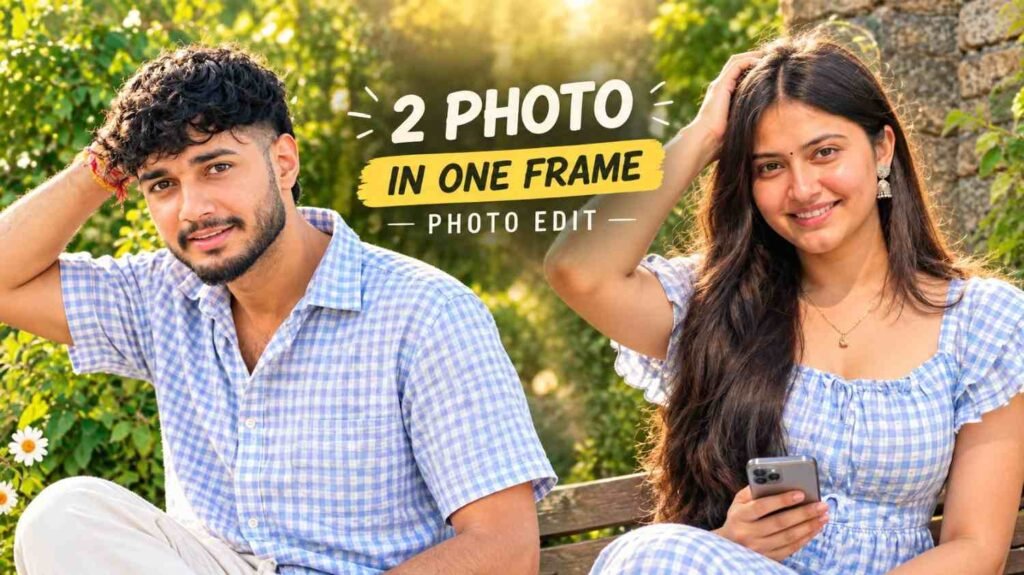
Agar aapke paas aisi location par proper photoshoot karne ka chance nahi hai, to AI Photo Editing se isi type ka look create karne ki koshish ki ja sakti hai. Aap apni normal photo upload karke background, outfit, pose aur overall styling ko apni choice ke according describe kar sakte hain.
Is article mein Aesthetic Sunshine AI Photo Prompt ke do versions diye gaye hain. Ek girls ke liye aur ek boys ke liye. Dono mein basic vibe same hai, lekin outfit aur pose ko alag rakha gaya hai.
Look Kaisa Hai?
Is photo concept mein bright outdoor sunlight main element hai. Background mein green plants aur rustic stone wall jaisa environment rakha gaya hai.
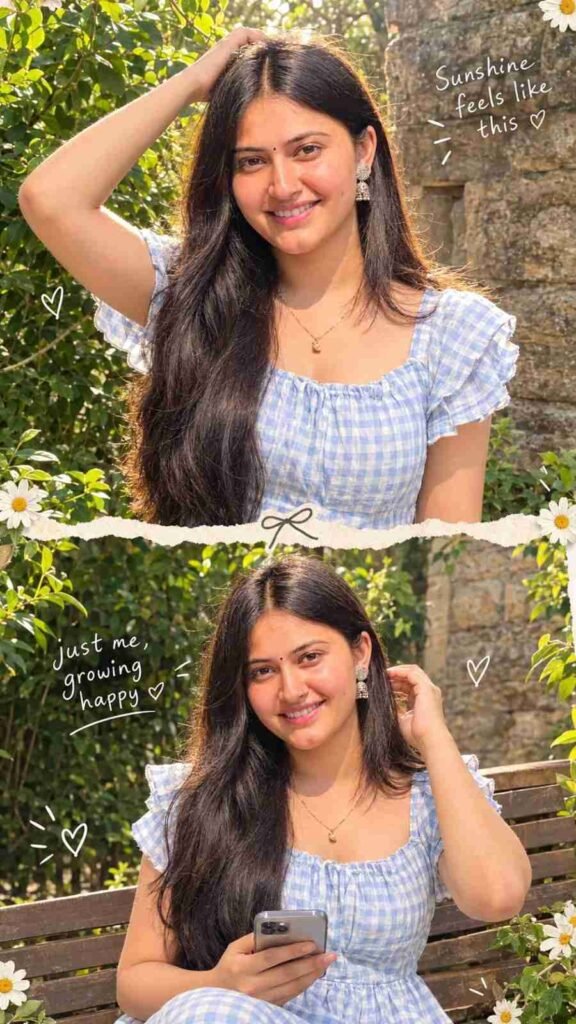
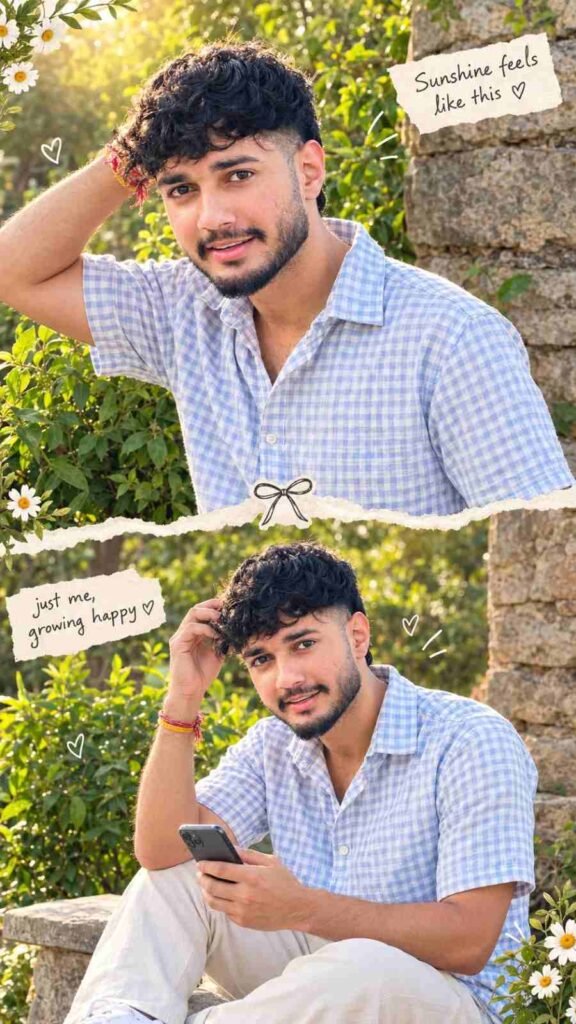
Girl version mein light-blue checkered dress, loose hair aur soft expression hai. Boy version mein casual checkered shirt, light trousers aur relaxed pose rakha gaya hai.
Dono images ko ek vertical two-photo collage mein combine kiya gaya hai. Beech mein torn-paper divider, small doodles aur handwritten-style text image ko scrapbook feel dete hai.
Photo Choose Kare
Sabse pehle apni ek clear photo select karein.
Face visible hona chahiye aur image bahut blurry nahi honi chahiye. Agar hair aur upper body bhi properly visible hain to overall result ko reference karna easier ho sakta hai.
Source photo par bahut heavy filter laga hua ho to natural output ke liye simple photo use karna better rahega.
Photo Upload Kare
Ab apni photo ko supported AI image editing tool mein upload karein.
Uploaded image ko identity reference ke roop mein use kiya jayega. Prompt mein facial features, hairstyle, skin tone aur body proportions ko preserve karne ki instructions di gayi hain.
Aapko pehle se same background wali reference image dene ki zarurat nahi hai.
Collage Ka Idea
Is concept ka main feature single portrait nahi, balki do coordinated photos ka collage hai.
Top aur bottom photo mein same person, same outfit aur same outdoor environment maintain karne ki koshish ki jaati hai. Isse final image ek proper photoshoot series jaisi feel de sakti hai.
Girls Ka Style
Girl version mein soft and cheerful look rakha gaya hai.
Light-blue and white gingham dress, ruffled sleeves, loose hair aur warm sunlight milkar ek bright summer-style appearance create karte hain. Pehle panel mein hand hair ke upar rakha gaya hai, jabki second panel mein smartphone ke saath relaxed seated pose diya gaya hai.
Small daisy flowers aur hand-drawn hearts collage ko more aesthetic touch dete hain.
Boys Ka Style
Boy version mein same concept ko thoda casual direction di gayi hai.
Light-blue and white checkered shirt, light trousers aur white sneakers ka combination simple outdoor fashion look deta hai. Top panel mein standing pose aur bottom panel mein smartphone ke saath seated pose rakha gaya hai.
Is version mein bhi warm sunlight, plants aur stone wall ko same visual theme ka part rakha gaya hai.
Ready Girl Prompt
Agar aap girl version banana chahte hai, to ye prompt use kar sakte hai:
🌸 Aesthetic Two-Photo Gingham Collage AI Prompt
Ready Boy Prompt
Boys ke liye same aesthetic concept ka ye version use kare:
☀️ Aesthetic Two-Photo Young Man Collage AI Prompt
Sunshine Ka Effect
Is style mein sunlight sirf brightness ke liye nahi hai. Backlight hair ke edges par soft glow create karti hai aur face par warm highlights deti hai.
Green background ke saath ye warm light image ko fresh aur natural appearance de sakti hai.
Is style mein sunlight sirf brightness ke liye nahi hai. Backlight hair ke edges par soft glow create karti hai aur face par warm highlights deti hai.
Pose Simple Rakhe
Aesthetic photos mein pose bahut complicated hone ki zarurat nahi hoti.
Hair ko lightly touch karna, camera ki taraf dekhna ya smartphone ke saath casually baithna jaise simple poses zyada natural lag sakte hain.
AI ko exact pose batane se random body position aane ki possibility kam ho sakti hai.
Result Natural Kaise Rakhe?
Agar AI image ko bahut smooth skin, excessive glow ya unrealistic colors deta hai, to prompt mein natural skin texture aur authentic smartphone photography ko clearly mention karein.
Lighting soft rakhein aur background ko overly bright na karein.
Aesthetic ka matlab har jagah effects add karna nahi hai. Clean composition bhi image ka important part hai.
Final Check
Image generate hone ke baad dono panels ko zoom karke check karein.
Face same lag raha hai ya nahi, hairstyle consistent hai ya nahi aur outfit dono photos mein properly match kar raha hai ya nahi, ye dekhein.
Hands, fingers, phone, flowers aur decorative elements mein bhi koi strange shape ho to final use se pehle correct karna better rahega.
Kya Ek Photo Kaafi Hai?
Haan, dono prompts ko single uploaded photo se start karne ke liye likha gaya hai.
Aapki normal photo identity reference provide karti hai aur AI prompt ke through outdoor location, outfit, pose, lighting aur collage design define kiya jata hai.
FAQ
Aesthetic Sunshine AI Photo Prompt kya hai?
Ye ek AI prompt concept hai jisme normal photo ko warm sunlight, green background aur aesthetic two-photo collage style mein transform karne ki koshish ki ja sakti hai.
Kya boys aur girls dono ke liye prompt hai?
Haan, is article mein boys aur girls dono ke liye separate prompts diye gaye hain.
Kya background change kar sakte hain?
Haan, plants aur stone wall ki jagah garden, cafe, balcony ya kisi aur suitable outdoor location ko describe kiya ja sakta hai.
Kya mobile se ye AI photo bana sakte hain?
Haan, supported AI image-generation features available hone par mobile se bhi photo upload karke prompt use kiya ja sakta hai.
Final Words
Aesthetic photo banane ke liye hamesha complicated setup ki zarurat nahi hoti. Soft sunlight, simple outfit, natural pose aur clean background milkar bhi ek attractive image create kar sakte hain.
Is article ke dono Aesthetic Sunshine AI Photo Prompt versions ka purpose ek normal photo ko polished two-photo lifestyle collage mein transform karne ki koshish karna hai.
Aap apni source photo upload karke girl ya boy version mein se suitable prompt use kar sakte hain. Result generate hone ke baad face, hands, outfit aur overall composition ko check karein aur zarurat ke according small changes karke final image prepare kare.